Developers
GuideMake your first API call
Create a personal access token, read your own profile and list your open tasks over the Volobox HTTP API, with curl, Node.js, C# or Python.
At the end of this guide you have a personal access token and a script that reads your own Volobox profile and lists the open tasks assigned to you. Any member of a workspace can do it: the token acts as you, so it reaches only what you can open yourself.
Before you begin
- A Volobox account in your workspace, and its address (this guide uses
https://volobox.example.com). - One of:
curl, Node.js 18 or later (save the example as an.mjsfile), .NET 8 or later, or Python 3 with therequestspackage.
Create a personal access token
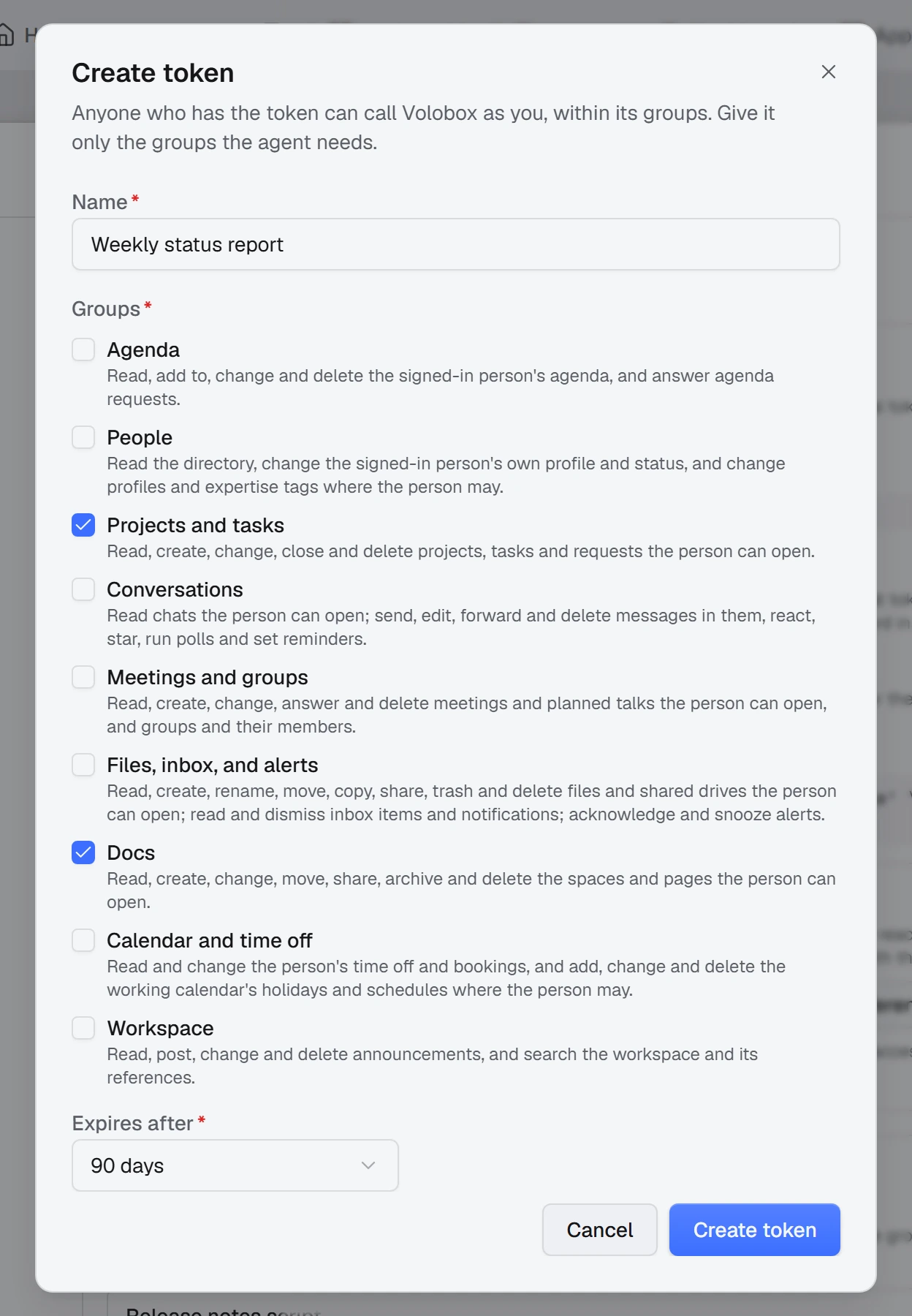
- In Volobox, open your menu, choose Settings, and open API & MCP.
- Under Personal tokens, click Create token.
- Give the token a name, such as "First API call".
- Select the action groups it may use. For this guide, select People and Projects and tasks. You can only select groups you can use yourself.
- Choose when it expires. 30 days is enough to try the API.
- Create the token and copy it. It starts with
vbpt_.
Warning: The token is shown once
Copy the token before you close the dialog; Volobox cannot show it again. Anyone who holds it acts as you within its groups, so keep it out of source control. If you lose it, revoke it and create another.
Keep the token in an environment variable for the rest of this guide:
export VOLOBOX_TOKEN='vbpt_...'$env:VOLOBOX_TOKEN = 'vbpt_...'Read your profile
Send the token as a bearer to GET /api/v1/app-user/my-profile:
curl -s https://volobox.example.com/api/v1/app-user/my-profile \
  -H "Authorization: Bearer $VOLOBOX_TOKEN"
const base = "https://volobox.example.com";
const headers = { Authorization: `Bearer ${process.env.VOLOBOX_TOKEN}` };
const res = await fetch(`${base}/api/v1/app-user/my-profile`, { headers });
if (!res.ok) throw new Error(`Volobox answered ${res.status}`);
const me = await res.json();
console.log(me.userName, me.email);using System.Net.Http.Headers;
using System.Net.Http.Json;
using System.Text.Json;
using var http = new HttpClient { BaseAddress = new Uri("https://volobox.example.com") };
http.DefaultRequestHeaders.Authorization =
new AuthenticationHeaderValue("Bearer", Environment.GetEnvironmentVariable("VOLOBOX_TOKEN"));
var me = await http.GetFromJsonAsync<JsonElement>("/api/v1/app-user/my-profile");
Console.WriteLine($"{me.GetProperty("userName")} {me.GetProperty("email")}");import os
import requests
BASE = "https://volobox.example.com"
HEADERS = {"Authorization": f"Bearer {os.environ['VOLOBOX_TOKEN']}"}
res = requests.get(f"{BASE}/api/v1/app-user/my-profile", headers=HEADERS, timeout=30)
res.raise_for_status()
me = res.json()
print(me["userName"], me["email"])The answer is your profile as JSON: id, userName, name, surname, email, jobTitle and more. The OpenAPI document described in the API overview has the full response schema.
List your open tasks
GET /api/v1/project-task/by-assignee lists the tasks assigned to a person across the projects you can open. Without an assignee it lists yours. Status filters by status name, and SkipCount and MaxResultCount page the answer. The examples continue the scripts above:
curl -s "https://volobox.example.com/api/v1/project-task/by-assignee?Status=Open&MaxResultCount=10" \
  -H "Authorization: Bearer $VOLOBOX_TOKEN"
const query = new URLSearchParams({ Status: "Open", MaxResultCount: "10" });
const tasksRes = await fetch(`${base}/api/v1/project-task/by-assignee?${query}`, { headers });
if (!tasksRes.ok) throw new Error(`Volobox answered ${tasksRes.status}`);
const { items, totalCount } = await tasksRes.json();
console.log(`${totalCount} open tasks`);
for (const task of items) console.log(`#${task.number} ${task.title} (${task.projectName}, ${task.workState})`);var page = await http.GetFromJsonAsync<JsonElement>(
"/api/v1/project-task/by-assignee?Status=Open&MaxResultCount=10");
Console.WriteLine($"{page.GetProperty("totalCount")} open tasks");
foreach (var task in page.GetProperty("items").EnumerateArray())
{
Console.WriteLine($"#{task.GetProperty("number")} {task.GetProperty("title")} " +
$"({task.GetProperty("projectName")}, {task.GetProperty("workState")})");
}res = requests.get(
f"{BASE}/api/v1/project-task/by-assignee",
params={"Status": "Open", "MaxResultCount": 10},
headers=HEADERS,
timeout=30,
)
res.raise_for_status()
page = res.json()
print(f"{page['totalCount']} open tasks")
for task in page["items"]:
print(f"#{task['number']} {task['title']} ({task['projectName']}, {task['workState']})")The answer is one page, { "items": [...], "totalCount": ... }. To read the next page, send SkipCount=10 with the same filters. Status and work state come back as names, such as "Open" and "InProgress".
Check that it works
- The profile call prints your own user name and email address.
- The task call prints how many open tasks are assigned to you, then up to ten of them with their number, title, project and work state. With none assigned, it prints
0 open tasks. - On Personal Settings > API & MCP, the token's row shows when it was last used.
Troubleshooting
| Symptom | Fix |
|---|---|
401 on every call | The Authorization header is missing or not Bearer followed by the token. Check that VOLOBOX_TOKEN is set in the shell that runs the script. |
401 with a token that worked before | The token was revoked or reached its expiry date, or your password was changed or reset, or two-factor authentication was turned on or off, which ends every personal token. Create a new token. |
403 with Volobox:Integrations:ActionNotGranted | The action is in a group the token does not have. A token's groups are fixed when it is made: create another token with that group. |
| You lost the token | It cannot be shown again. Revoke it on its row and create another. |
| The task list is empty but you have tasks | Status=Open leaves out drafts and closed tasks, and the list covers only projects you can open. |
Next steps
- API overview: authentication, paging, enums and errors.
- Projects API: every task, request and project endpoint.
- Connect an MCP client: give the same token to an AI agent.
- Build an OAuth integration: let other people sign in to your tool.