Developers
GuideBuild an OAuth integration
Register an integration app, sign people in with authorization code and PKCE, export the audit log with client credentials, rotate and revoke.
At the end of this guide you have an integration app registered in Volobox, and either a tool that signs people in and calls the API as each of them, or a service that exports the organization audit log with a client secret. Registering the app needs the Manage API and MCP clients and webhooks permission; once it exists, any member can sign in through it.
Before you begin
- The Manage API and MCP clients and webhooks permission in your workspace.
- For an app people sign in through: the address your app receives the sign-in on (its redirect URI).
- For a service: a secret store for the client secret, such as your CI system's or your cloud's.
curlto follow the examples; the last example also usesjq.
Choose what the app is
| People sign in through it | A service, with the client secret | |
|---|---|---|
| Acts as | The person who signs in | The app itself, nobody behind it |
| Flow | Authorization code with PKCE | Client credentials, or the secret as a bearer |
| Reaches | The app's groups, within what each person ticks on the consent page and can open | Audit log only |
| Typical use | An external agent, a company tool, a command-line tool | A SIEM or collector that exports audit events |
Register the app
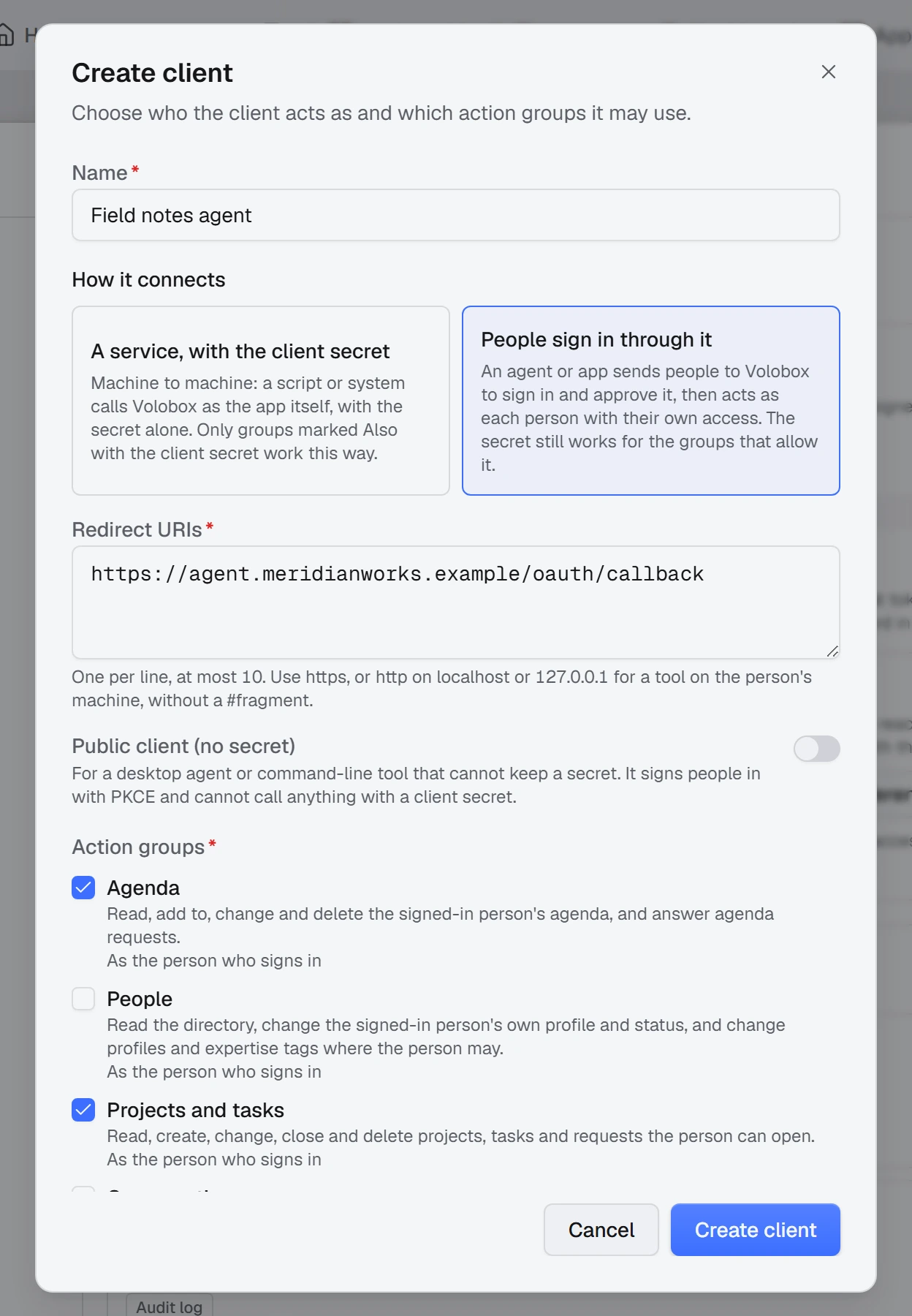
- In Volobox, open Admin at the bottom of the left activity rail, then Settings, and open API & MCP. Choose API or MCP: the apps are the same list.
- Click Create client and enter a name. People see it on the consent page.
- Under How it connects, choose People sign in through it or A service, with the client secret.
- Select the action groups. Each group says whom it works for: As the person who signs in, or for Audit log, Also with the client secret. A service is offered only the groups marked Also with the client secret.
- For People sign in through it, enter the Redirect URIs (see the rules below). Turn on Public client (no secret) for a command-line tool or desktop agent that cannot keep a secret: it signs people in with PKCE alone.
- Create the client, then copy the client id and, for a confidential app, the client secret (
vbox_...).
Warning: The secret is shown once
Copy the client secret before you close the dialog. It is not shown again, and it does not expire on its own: it works until you rotate it or revoke the app. Keep it in a secret store, never in source control.
Redirect URI rules
| Rule | Detail |
|---|---|
| Address | An absolute https:// address, or http://localhost... or http://127.0.0.1... for a tool on the person's own machine. |
| Loopback ports | On a loopback address the port is not compared, so a local tool may listen on any port. One line such as http://127.0.0.1/callback is enough. |
| Own schemes | An app's own scheme, such as myagent://callback, is not accepted. |
| Count | At most 10 per app. |
| Match | The redirect_uri your app sends must be one of the app's Redirect URIs exactly. |
Sign people in with the authorization code flow
Before each sign-in, make a PKCE pair and a state value. The code challenge is the base64url SHA-256 of the verifier, without padding:
import crypto from "node:crypto";

const codeVerifier = crypto.randomBytes(32).toString("base64url");
const codeChallenge = crypto.createHash("sha256").update(codeVerifier).digest("base64url");
const state = crypto.randomBytes(16).toString("base64url");
import base64
import hashlib
import secrets
code_verifier = secrets.token_urlsafe(32)
code_challenge = (
base64.urlsafe_b64encode(hashlib.sha256(code_verifier.encode("ascii")).digest())
.rstrip(b"=")
.decode("ascii")
)
state = secrets.token_urlsafe(16)-
Send the person's browser to the authorization endpoint, with your values URL-encoded:
Texthttps://volobox.example.com/connect/authorize?response_type=code&client_id=CLIENT_ID&redirect_uri=REDIRECT_URI&scope=Volobox%20offline_access&code_challenge=CODE_CHALLENGE&code_challenge_method=S256&state=STATEscope=Voloboxis required;offline_accessadds a refresh token. PKCE withS256is required. -
The person signs in to Volobox (with two-factor authentication, the code is asked on the same page) and sees a consent page that names your app and lists its action groups as checkboxes, every one ticked the first time. A group the person unticks stays out of your app's reach as them.
-
Volobox sends the browser back to your redirect URI with
codeandstate. Check thatstateis the value you sent. -
Trade the code for tokens at the token endpoint. A confidential app also sends
client_secret; a public client does not:Bashcurl -s -X POST 'https://volobox.example.com/connect/token' \ -H 'content-type: application/x-www-form-urlencoded' \ -d 'grant_type=authorization_code&client_id=CLIENT_ID&client_secret=CLIENT_SECRET&code=CODE&code_verifier=CODE_VERIFIER' --data-urlencode 'redirect_uri=REDIRECT_URI'The answer is a standard OAuth token response:
JSON{ "access_token": "ACCESS_TOKEN", "token_type": "Bearer", "expires_in": 3600, "refresh_token": "REFRESH_TOKEN", "scope": "Volobox offline_access" } -
Call the API with the access token as a bearer. The call acts as the person, within the groups they left ticked and what they can open:
Bashcurl -s https://volobox.example.com/api/v1/app-user/my-profile \ -H 'Authorization: Bearer ACCESS_TOKEN' -
The access token lasts one hour. Before it runs out, trade the refresh token for a new pair, and store the new refresh token in place of the old one. A public client leaves out
client_secret:Bashcurl -s -X POST 'https://volobox.example.com/connect/token' \ -H 'content-type: application/x-www-form-urlencoded' \ -d 'grant_type=refresh_token&client_id=CLIENT_ID&client_secret=CLIENT_SECRET&refresh_token=REFRESH_TOKEN'
The consent page is shown once per app. To let a person change their choice, send them to sign in again with prompt=consent added to the authorization URL; the boxes open as they last left them. A narrower choice reaches a token your app already holds when that token is renewed, within an hour.
Note
Never ask for a person's password in your app, and do not use a password grant. With two-factor authentication on, a password alone is refused. The authorization code flow handles two-factor authentication on Volobox's own page.
Export the audit log with client credentials
A service app with Audit log exports the organization audit log as JSON lines.
-
Request an access token with the client id and secret. Without
scope=Voloboxthe token is issued but every call answers401:Bashcurl -s -X POST 'https://volobox.example.com/connect/token' \ -H 'content-type: application/x-www-form-urlencoded' \ -d 'grant_type=client_credentials&client_id=CLIENT_ID&client_secret=CLIENT_SECRET&scope=Volobox'The token lasts one hour; request another when it expires. The secret itself also works directly as a bearer.
-
Read the export one page at a time from
GET /api/v1/audit-log/export/jsonl. The body is NDJSON (application/x-ndjson), one JSON object per line.PageSizedefaults to 500 and is at most 1000. TheX-Volobox-Next-Cursorresponse header carries the next page's cursor: send it back asCursorwith the same filters, until the header is absent.Bash# Read these from your secret store. export CLIENT_ID="CLIENT_ID" CLIENT_SECRET="CLIENT_SECRET" TOKEN=$(curl -s -X POST 'https://volobox.example.com/connect/token' \ -H 'content-type: application/x-www-form-urlencoded' \ -d "grant_type=client_credentials&client_id=$CLIENT_ID&client_secret=$CLIENT_SECRET&scope=Volobox" \ | jq -r .access_token) CURSOR= while true; do ARGS=(--data-urlencode "FromUtc=2026-11-01T00:00:00Z" --data-urlencode "PageSize=500") [ -n "$CURSOR" ] && ARGS+=(--data-urlencode "Cursor=$CURSOR") curl -s -G -D headers.txt -H "Authorization: Bearer $TOKEN" "${ARGS[@]}" \ 'https://volobox.example.com/api/v1/audit-log/export/jsonl' >> audit.jsonl CURSOR=$(grep -i '^X-Volobox-Next-Cursor:' headers.txt | awk '{print $2}' | tr -d '\r') [ -z "$CURSOR" ] && break done
The other filters (ToUtc, Categories, EventKeyPrefix, ActorFilter and more) are in the Audit log API.
Rotate and revoke
On the app's row in API & MCP:
- Edit changes the name, the groups, How it connects and the redirect URIs.
- Rotate secret in the ⋯ menu replaces the secret and ends every token the app was issued. Put the new secret in your secret store before your service's next token request.
- Revoke in the ⋯ menu stops the app at once: its secret, every token issued through it, and every person's sign-in through it. An old token is refused with
401everywhere. - Delete in the ⋯ menu removes a revoked app's row, together with every person's consent to it. An active app cannot be deleted, only revoked.
Some edits also end the app's issued tokens, and people sign in again and see the consent page: switching a sign-in app to a service, switching between public and confidential, and adding a group. Taking a group away needs no new sign-in: the next call no longer reaches it.
Check that it works
- For a sign-in app, the
my-profilecall with the access token returns the profile of the person who signed in. - For a service, the export loop writes lines of audit events to
audit.jsonl. - The app's row shows its kind: Sign-in, Secret, or Sign-in and secret.
Troubleshooting
| Symptom | Fix |
|---|---|
| The sign-in fails with "redirect_uri is not valid" | The address your app sent is not one of the app's Redirect URIs. Add it exactly. |
Every call with a client credentials token answers 401 | The token request left out scope=Volobox. Request a new token with it. |
A call with the secret answers 403 with Volobox:Integrations:MemberConnectionRequired | The action acts as a person: a group other than Audit log, or an action about the signed-in person. Sign the person in through the app, or have them use a personal token. |
A call answers 403 with Volobox:Integrations:ActionNotGranted | The action is outside what the bearer reaches: not in the app's groups, unticked by the person, or a permission the person lacks. |
An old token answers 401 after you rotated or revoked | Expected: rotating and revoking end every issued token. Get a new one. |
| Creating the app says the OAuth application limit is reached | Delete an unused OAuth application or revoke an app. Plan limits are on Pricing. |
| You need a grant other than authorization code or client credentials | Use Organization Settings > OAuth. Apps created there do not appear on API & MCP. |
Next steps
- API overview: bearers, groups, paging and errors.
- Audit log API: the export's filters.
- MCP server: the same app's bearer on the MCP server.
- Receive and verify webhooks: get events pushed instead of polling.